How to flash samsung using odin tutorial

How to flash samsung using odin tutorial


Download this
ODIN DOWNLOAD LINK
samsungkies for usb driver


Follow these steps to enter Download Mode/Odin Mode
  1. Power off your device
  2. Press and hold Volume Down key, Home Key and Power Key
  3. When your device vibrates, release Power key while keep holding the Volume Down key and Homekey
  4. Boot into download mode
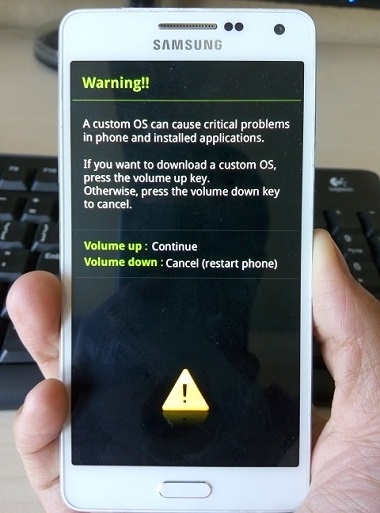
    Warning before entering into download mode
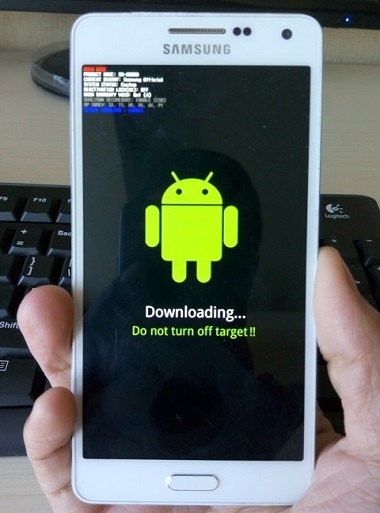
  5. Press Volume Up key to enter Download mode, which has a green robot figure and �Downloading� Do not turn off target!!)
  6. Boot into download mode
    Now you are in download mode.
Step 5: Connect your device to PC.
You device should be automatically recognized by Odin. At the lower-left of Odin interface, it should show a message that says "Added!" and in the meantime you should see a light-blue box at the ID:COM section stating "COM:3" (the number depend on which USB port you have plugged the device cable and is irrelevant).
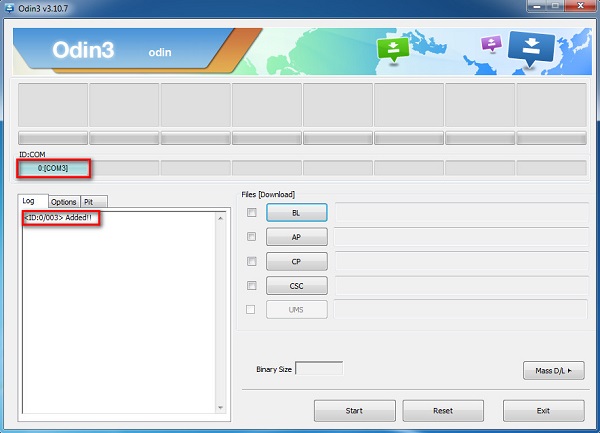
Connect device to Odin
Device is connected to Odin.
Step 6: Click "PDA" or "AP" to add tar.md5 file that you have extracted and then "Start".
Whether it is "PDA" or "AP" depends on the version of Odin that you used. But the md5 file goes to either "PDA" or "AP".
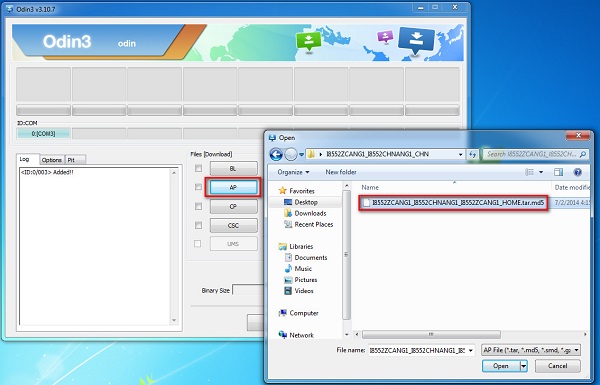
Add md5 file to Odin
Add *.md5 to Odin.
After adding the file, click "Start" to begin the flashing process.
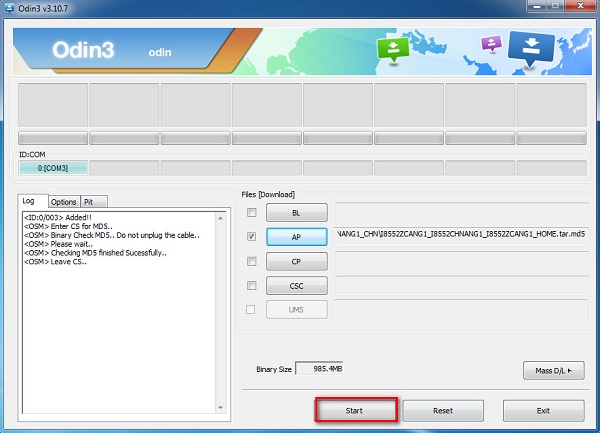
Click start to flash stock rom
Click "Start" to flash.
WARNING DO NOT REMOVE OR OPERATE ON YOUR DEVICE UNTIL FINISHED OR FAILED IS SHOWED ON ODIN.
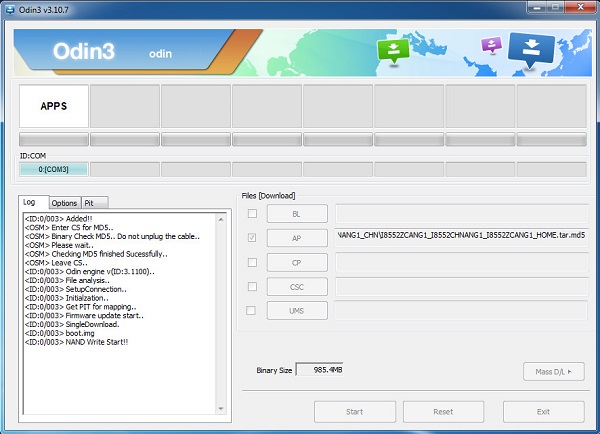
Starting to flash stock rom via Odin
Ongoing flashing process. Do not remove your device.
When the flashing process is done and if everything goes well, you should see a big green box saying "RESET" or "PASSED" (depends on the version of Odin is used). By now, the device should be rebooted and it is safe to remove/unplug your device.

Succeed to flash stock rom via Odin
Flash succeeded.

download file now

Comments

Popular posts from this blog

PLDT AURA TELPAD MA7 Firmware ROM RK3066

PLDT AURA TELPAD MA7 Firmware ROM RK3066 PLDT AURA TELPAD MA7 Firmware Rom is Flash using CM2 Rockchip tool to same model. The figure image on top picture shows the actual unit of PLDT AURA TELPAD. This Telpad motherboard id: MA7 V15 20150113 was revived from hang on start-up problem. After completely flash using said tool continue read below about what is ROM about The firmware RK3066__RK30SDK__rk3188__eng.20150923.180554 .irkfw was already flash using CM2 tools using write firmware button. Here some Logs may viewers will need to understand what ROM about Connect device to PC! Hold VolUp+VolDown or VolUp, insert USB cable, press PowerOn! Found active FlashInterface , connecting ... Detected : RK3066 Read Info Ok! Selected   : RK3066__RK30SDK__rk3188__eng.20150923.180554.irkfw FastVerify : Ok , 0x323C5159 FwInfoBlk  : 0x0009 Load Ok! Operation : Flash [ v1.0 ] INFRK Image : RK3066__RK30SDK__rk3188__eng.20150923.180554.irkfw Will flash INFRK image now... Update PMT ... Prepare...

ZH K ODYSSEY BEST Firmware ROM

ZH K ODYSSEY BEST Firmware ROM T his ZH&K ODYSSEY BEST Firmware ROM have a problem in Hang on logo start-up screen The figure image on top picture shows the actual unit of ZH&K model ODYSSEY BEST and the ROM info below BB_CPU_NME   : [MediaTek] MT6580_S00 BB_CPU_EXT     : 0xCA00 , 0x8A00 , 0x0000 EMMC                 : FLASH_UCP : 7376 MiB [eMMC 8 GiB] Device name          : ZH&K ODYSSEY BEST Android Version    : 5.1 lollipop MTK CPU            : MT6580 MTK Project         : ALPS.L1.MP6.V2_YUANDA6580.WE.L MODEM :   BaseBand  : MT6580_S00_MOLY_WR8_W1449_MD_WG_MP_V6_P2_1_wg_n After completely flash using Sp flash Tool , The phone revived again from Hang on start-up The firmware was already flash using SP flash tools using download only button. And can be read more step by step HERE about tutorial and download SP Flash tool. If y...

ENES G10 FIRMWARE ROM

ENES G10 FIRMWARE ROM Firmware Rom is backup using Chinese Miracle tool. The figure image on top picture shows the actual unit of ENES G10+ This ENES G10+ firmware was back-up after restore factory the phone Firmware Info backup Chinese Miracle II (CM2 MTK Tool) Created by Infinity-Box (c) Chinese Miracle II (c) 2016 Device Brand   : alps Device Model   : hys72kk_c300_q10_g10_2g Device CPU     : MT6572 Device IntName : hys72kk_c300_q10_g10_2g Device Version : 5.0.1 Device Compile : 6/8/2016 3:19:46 AM Device Project : ALPS.KK1.MP7.V1.5 Device ExtInfo : G10+ The ENES G10+ ROM is backup as scatter file Can be flash back using any Mediatek tool if you dont have CM2 That support scatter base loader. ROM support scatter base file like SP flash Tool> read below LINK. How to Flash Firmware step by step procedure as see the figure below show a complete backup using CM2 tools Firmware can use to same model about have problem about software related problem Hang, no power, p...